🪃 Custom Items
Unlimited Adventures includes a built-in, powerful custom items system — no extra plugins needed.
This guide will show you how to create, modify, summon, and texture your own custom items.
You can access custom items menu by executing: /getitems
To get a specific item, execute: /giveitem [item name] [player name] [amount]
🔓 How to unlock a Workshop Schematic?
There are 3 methods:
- 💎 Players can unlock new schematics by finding them in chests in The Wilderness.
Player needs to hold the schematic in their hand and click on Workshop block to learn it. - You can summon it using a command:
/giveitem workshop_schematic:item_name - Unlock item directly using unlock command:
- 🔓 Unlock a recipe:
/workshopunlock [player name] [item name],
for example:/workshopunlock simon catching_net - 🔒 Lock a recipe:
/workshoplock [player name] [item name],
for example:/workshoplock simon catching_net
➕ How to add new items?
It's really easy to add new items, read more below:
🗒️ All custom items can be found in: 📁unlimited_adventures/CustomItems/items/:
items:
    traveler_backpack:
        name: "&aTraveler's Backpack"
        item: stick
        custom_model_data: 501
        model_custom_model_data: 101
        lore:
        - ''
        - "&7Basic backpack. Can fit 18 items."
        rows: 2
        item_id: traveler_backpack
    adventure_backpack:
        name: "&aAdventurer's Backpack"
        item: stick
        custom_model_data: 502
        model_custom_model_data: 102
        lore:
        - ''
        - "&7Sizeable backpack. Can fit 36 items."
        rows: 4
        item_id: adventure_backpack
➕ You can add new items simply by duplicating an existing item from the config and changing its name and properties to your liking:
dino_sword:
    name: "&6Dinosaur Sword"
    item: diamond sword
    lore:
    - "&7This sword belongs to"
    - "a very cool dinosaur."
💎 On Unlimited Adventures, there are accessories you can wear in the gear menu. Let's create one:
belt_of_vitality:
    name: "&aBelt of Vitality"
    item: stick
    custom_model_data: 720
    lore:
    - ''
    - "&7Increases health."
    - ''
    - "§x&d&f&5&2&5&2+4 Health ❤"
    - ''
    - "§x&8&f&6&4&d&eᴀᴄᴄᴇssᴏʀʏ ɪᴛᴇᴍ"
    health: 8
    regeneration: 8
    accessory: true
As you can see, I have specified the name, item type, custom model data (so the item can have its own custom texture) and wrote a short lore description.
But the most important things are down below, the health and regeneration statistics are applied on the player when he's wearing the accessory.
⚙️ Available attributes:
- Strength
- Health
- Regeneration
- Luck
- Wisdom
- Toughness
- Speed
- Fuel
- Night_vision
- Haste
- Oxygen
🎨 Give your item a custom texture
Upload your new texture to the server resource pack
- First, you have to add the texture to your resource pack. You need to download it on your computer so you can update it.
- Put your texture in the 📁
assets/minecraft/textures/custom/items/folder. - Now you need to create a model for your texture, no matter whether it's 3D or not, this model allows us to create a brand new texture, instead of having to sacrifice existing Minecraft items:
Go to 📁assets/minecraft/models/custom/items/. Create a new .json file or just copy the amethyst_axe.json and rename it to your items name.
Edit its content:
{
  "parent": "item/handheld",    <---  Change this to "item/generated" if the item you're creating is not held like a tool.
  "textures": {
    "layer0": "custom/items/dino_sword"
  }
}
- Now we need to link this model to a custom model data of an existing vanilla item - I'll use diamond sword.
Go to assets/minecraft/models/item/diamond_sword.json
{
  "parent": "minecraft:item/handheld",
  "textures": {
    "layer0": "minecraft:item/diamond_sword"
  },
  "overrides": [
  { "predicate": {"custom_model_data": 730}, "model": "custom/items/bone_sword"},
  { "predicate": {"custom_model_data": 731}, "model": "custom/items/emerald_sword"},
  { "predicate": {"custom_model_data": 732}, "model": "custom/items/copper_sword"},
  { "predicate": {"custom_model_data": 733}, "model": "custom/items/amethyst_sword"},
  { "predicate": {"custom_model_data": 734}, "model": "custom/items/crocodile_sword"},
  { "predicate": {"custom_model_data": 735}, "model": "custom/items/venomous_fang_dagger"},
  { "predicate": {"custom_model_data": 736}, "model": "custom/items/dino_sword"}
  ]
}
We are linking it to the path of the model we have created in the previous step. Full path is assets/minecraft/models/custom/items/dino_sword.json
Update the item config
Now we'll add the just assigned custom model data to our custom item's config.
unlimited_adventures/CustomItems/items/items.yml:
dino_sword:
    name: "&6Dinosaur Sword"
    item: diamond sword
    custom_model_data: 736   <-----   Add this line! ⚙️
    lore:
    - "&7This sword belongs to"
    - "a very cool dinosaur."
🗡️ Add a Backtool model to your item
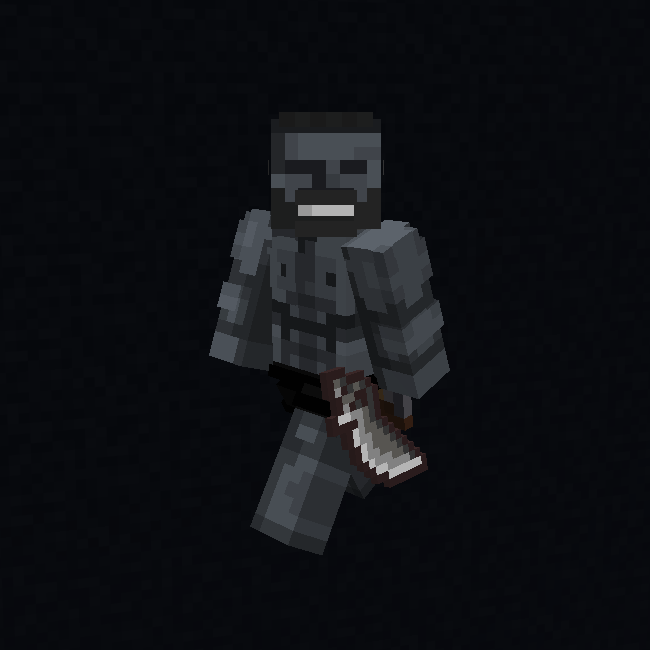
Backtools are the models that render next to your waist or on your back, when you have particular tools and items in your hotbar. Here's how to add it to your custom item.
➕ Create a Backtool model
- Prepare your model. You can use a model from 📁
assets/minecraft/models/custom/backtools/as an example.
If your item is flat (2D), you can simply replace the path to your item in resource pack, and then adjust the offset using Blockbench, when necessary.
{
	"credit": "Made with Blockbench",
	"parent": "item/generated",
	"textures": {
		"layer0": "custom/items/dino_sword"
	},
	"display": {
		"thirdperson_lefthand": {
			"rotation": [170, 90, 0],
			"translation": [-8, -9, -30],
			"scale": [0.6, 0.6, 0.6]
		}
	}
- Add the model to your resource pack. Put it in 📁
assets/minecraft/models/custom/backtools/ - Add a path to the Backtool model to
assets/minecraft/items/feather.jsonand specify its model data value (threshold):
(...)
{"threshold":104,"model":{"model":"custom/backtools/dino_sword","type":"model"}},
(...)
⚙️ Add the model to your custom item's config
In your Custom Items config: 📁unlimited_adventures/CustomItems/Items/, find your item and add the custom model data of your backtool model:
amethyst_sword:
    name: "&rAmethyst Sword"
    item: diamond sword
    custom_model_data: 733
    backtools_model: 104   <-----   Add this line! ⚙️
📜 How to add/change crafting recipes?
You can easily add your own workshop recipes or modify existing ones.
The folder with recipes can be found in: 📁unlimited_adventures/CustomItems/recipes/
recipes:
    dynamite:
    - 1 of tnt
    - 3 of string
    - 3 of iron ingot
    catching_net:
    - 5 of string
    - 3 of slimeball
(...)
2 Placeholders available:
| Placeholder | Description |
|---|---|
%valiant_craftingunlocked_ITEM% | returns 'true', if crafting of the specified item is unlocked. |
%valiant_cancraft_ITEM% | returns 'true', if the player has required items to craft the item. |